 GlucoSpike AI
CGM Trend Arrows Explained: What Every Arrow Means and What to Do
CGM trend arrows tell you where your glucose is heading and how fast — not just where it is right now.
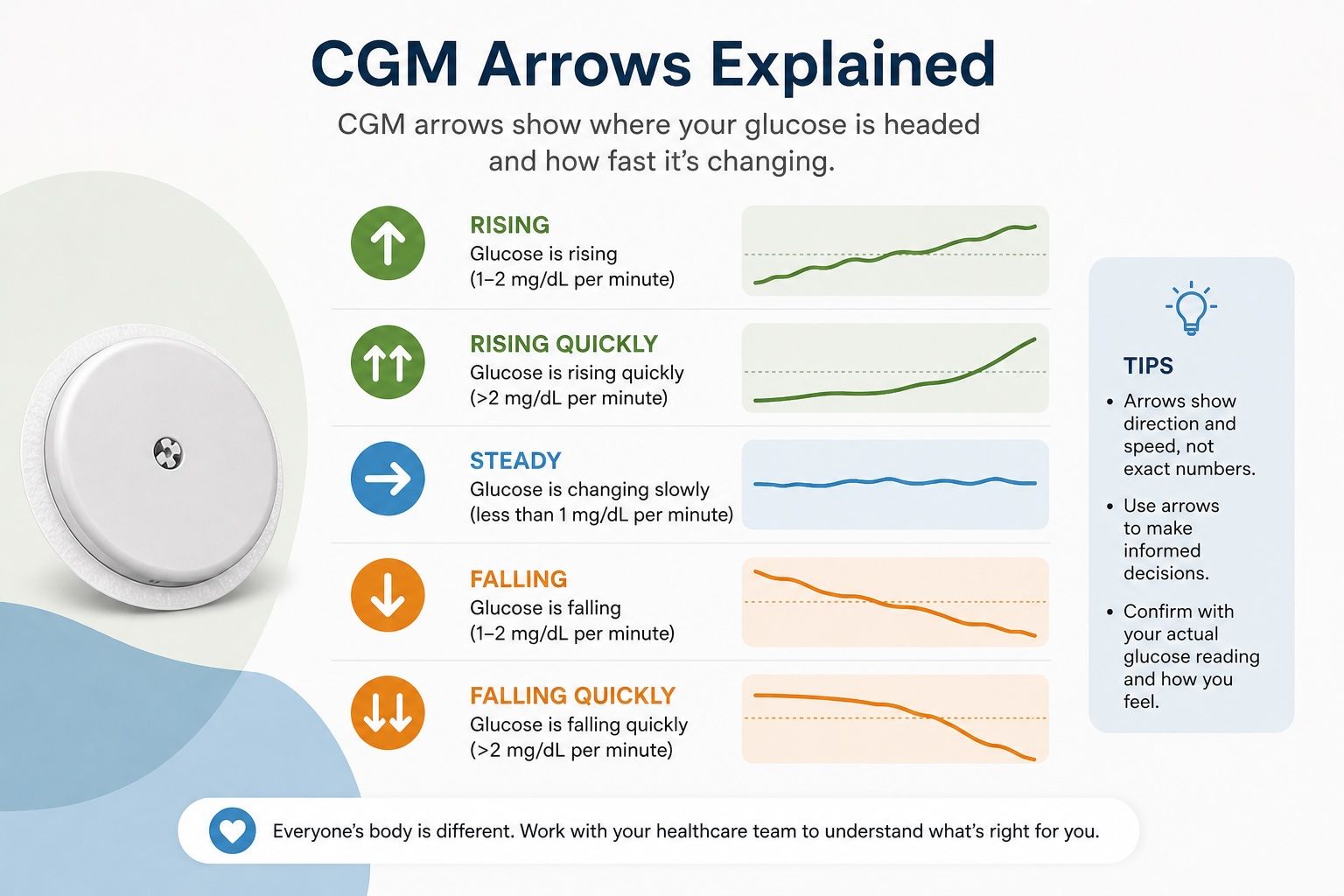
A CGM reading without a trend arrow is only half the information. Knowing your glucose is 120 mg/dL tells you where you are right now. The arrow tells you where you're going and how fast — and that's what actually determines whether you need to act.
This guide covers what every trend arrow means on the major CGM platforms, how to read them in combination with your current glucose number, and the common mistakes new users make when reacting to arrows.
Why Trend Arrows Matter
Blood glucose doesn't sit still. It rises and falls constantly in response to food, exercise, insulin, stress, sleep, and dozens of other factors. A CGM measures your interstitial glucose every 1–5 minutes, and trend arrows summarize the direction and rate of that change in a single glance.
Consider two people who both show 120 mg/dL on their CGM. One is rising rapidly toward 180 mg/dL. The other is falling toward 80 mg/dL. The number alone tells you nothing about where they're headed. The arrow does.
CGM Trend Arrow Legend: All 7 Arrows Explained
The arrow system is consistent across Dexcom G7, Dexcom Stelo, FreeStyle Libre 3 Plus, Abbott Libre Rio, and Medtronic Simplera, though exact rate thresholds vary slightly by device.
| Arrow | Label | What It Means | Rate of Change |
|---|---|---|---|
| ⇑⇑ | Double arrow up | Rising rapidly | More than 3 mg/dL per minute |
| ↑ | Single arrow up | Rising | 2–3 mg/dL per minute |
| ↗ | Diagonal arrow up | Rising slowly | 1–2 mg/dL per minute |
| → | Horizontal arrow | Stable | Less than 1 mg/dL per minute |
| ↘ | Diagonal arrow down | Falling slowly | 1–2 mg/dL per minute |
| ↓ | Single arrow down | Falling | 2–3 mg/dL per minute |
| ⇓⇓ | Double arrow down | Falling rapidly | More than 3 mg/dL per minute |
What Each Arrow Means in Practice
Double Arrow Up (⇑⇑): Rising Rapidly
Your glucose is climbing more than 3 mg/dL per minute — which means it could rise 30+ mg/dL in the next 10 minutes if nothing changes. This is the most urgent upward signal.
This typically appears during or shortly after eating a high-glycemic meal, especially if eaten quickly. For insulin users, a rapidly rising glucose may warrant a correction dose — always follow your healthcare provider's specific guidance. For non-insulin users, this is a signal to note which meal is responsible and consider pairing strategies next time.
Single Arrow Up (↑): Rising
Glucose is climbing at 2–3 mg/dL per minute — meaningful but not yet in urgent territory. This is common 30–60 minutes after a carb-heavy meal. For most people without insulin, this resolves on its own as the body processes glucose. For insulin users, your care provider may have specific guidelines for correcting at this rate of rise.
Diagonal Arrow Up (↗): Rising Slowly
Glucose is increasing at 1–2 mg/dL per minute. This is a mild upward trend — common after moderate carbohydrate meals or coffee with milk. Usually resolves without intervention for non-insulin users. For insulin users, it's generally not urgent but worth watching to see if it continues.
Horizontal Arrow (→): Stable
Glucose is changing less than 1 mg/dL per minute — essentially flat. This is the ideal trend for most situations. It indicates your current glucose level is stable, which is most likely during fasting periods or after a well-balanced meal. If you're in range and flat, there's nothing to do.
Diagonal Arrow Down (↘): Falling Slowly
Glucose is dropping at 1–2 mg/dL per minute. This is common as glucose returns to baseline after a meal, or during mild exercise. Generally not concerning unless your current level is already close to the low threshold (typically 70 mg/dL) — in which case, monitor closely.
Single Arrow Down (↓): Falling
Glucose is dropping at 2–3 mg/dL per minute. Combined with a current reading approaching 80 mg/dL, this warrants attention — you could hit a low in 10–15 minutes. For insulin users, this is a significant signal that typically requires some fast-acting carbohydrates unless you've just eaten. For non-insulin users, a falling arrow in the low 80s is a cue to have a small snack.
Double Arrow Down (⇓⇓): Falling Rapidly
This is the most urgent arrow. Glucose is dropping faster than 3 mg/dL per minute. If you're also below 100 mg/dL, you're approaching a low quickly.
For insulin users, this typically requires immediate action — fast-acting carbohydrates (glucose tabs, juice) and monitoring. Always follow your healthcare provider's specific hypoglycemia protocol. For non-insulin users, double-down arrows are uncommon except during prolonged exercise, fasting, or with certain medications.
Reading the Arrow and Number Together
The arrow and the number together tell a fuller story than either alone. Here are the combinations that matter most:
| Reading + Arrow | What It Likely Means | Action |
|---|---|---|
| 180 mg/dL ⇑⇑ | High and rising fast | Insulin users: consider correction per care plan. Note the meal. |
| 120 mg/dL ↗ | In range, rising slowly | Common post-meal. Monitor. Usually resolves. |
| 100 mg/dL → | In range, stable | Ideal. No action needed. |
| 85 mg/dL ↘ | Low-normal, falling slowly | Watch closely, especially if you haven't eaten recently. |
| 75 mg/dL ⇓⇓ | Near-low, falling rapidly | Insulin users: treat immediately. Non-insulin: eat fast carbs. |
Dexcom G7 and Stelo Trend Arrows
Dexcom uses the same seven-arrow system described above. Arrows appear next to the glucose number on the main screen of the Dexcom app and on the receiver. The Dexcom Clarity app plots arrows historically, which is useful for identifying patterns across meals and activities.
One Dexcom-specific note: during the sensor warmup period (first 30 minutes after insertion), trend arrows may not yet be reliable. Wait for the warmup to complete before acting on arrow data from a new sensor.
The OTC Dexcom Stelo uses the same arrow system as the G7. The primary difference is that Stelo does not alert for hypoglycemia, so the double-down arrow is still visible but won't trigger an alarm.
FreeStyle Libre Trend Arrows (Libre 3 Plus and Libre Rio)
FreeStyle Libre uses the same directional arrow system with similar rate-of-change thresholds. One notable difference: Libre's 1-minute reading interval (vs. Dexcom's 5-minute interval) can produce slightly more responsive trend arrows during rapid changes.
Libre displays trend arrows in the LibreLink app and on the reader device. The historical glucose graph in the app shows how arrows correlated with meals and activities, making it a useful tool for pattern analysis after the fact.
Common Mistakes New CGM Users Make With Trend Arrows
Chasing a perfectly flat line. Some glucose variability is completely normal. Trying to keep glucose perfectly flat at all times leads to over-restriction, anxiety, and often unnecessary snacking to prevent imagined lows. A small rise and fall after meals is expected physiology, not a problem to solve.
Panicking at a rising arrow after eating. A single arrow up 45 minutes after a meal is normal digestion. The relevant question is whether glucose rises above 140–180 mg/dL and how quickly it returns to baseline — not whether it rises at all.
Acting on the arrow without considering the current level. A down arrow at 120 mg/dL requires no action. A down arrow at 75 mg/dL does. Always read the arrow and the number together, never in isolation.
Not accounting for sensor lag. CGM sensors measure interstitial glucose, which lags behind blood glucose by 5–15 minutes. During rapid rises or falls, your CGM reading may be 10–20 mg/dL behind your actual blood glucose. This is especially important for insulin users making correction decisions during rapid changes — a fingerstick confirms the real-time level.
Treating individual readings instead of patterns. A single double-up arrow is less meaningful than consistently seeing double-up arrows after the same meal. The trend over multiple days is far more informative than any individual reading. Use the history view in your CGM app to look for repeated patterns rather than reacting to every alert.
Using Trend Arrows to Improve Your Meals
For people using CGMs for metabolic health rather than insulin management, trend arrows are most useful as meal feedback. A meal that produces only a diagonal-up arrow and returns to baseline quickly is a very different meal from one that produces a double-up arrow and stays elevated for 3 hours.
Two habits that consistently flatten post-meal arrows are meal sequencing (eating protein and fiber before carbs) and a 10-minute walk after eating. Both are well-supported by research and the effect is visible in real time on a CGM. If you're curious about the mechanism, our meal sequencing guide covers the GLP-1 connection in detail.
If you don't have a CGM and want to understand your meal-level glucose patterns without the hardware cost, GlucoSpike AI scores every meal from 0 to 10 for predicted glucose impact. At $39.99/year it's a wearable-free alternative for people focused on meal awareness rather than continuous monitoring.
Frequently Asked Questions
What does a double up arrow mean on a CGM?
A double up arrow (⇑⇑) means your glucose is rising rapidly — typically more than 3 mg/dL per minute. It usually appears during or shortly after eating a high-carbohydrate meal. For insulin users, this often warrants a correction dose per your care plan. For non-insulin users, it's a signal to note which meal caused the rapid rise and consider adjusting that meal next time.
What does a double down arrow mean on Dexcom G7?
A double down arrow (⇓⇓) on Dexcom G7 means glucose is falling faster than 3 mg/dL per minute. If this appears when your glucose is already below 100 mg/dL, you're heading toward a low quickly. Insulin users should follow their care team's hypoglycemia treatment protocol. The Dexcom G7 will also sound an urgent low alarm if glucose falls below your alert threshold.
What do the arrows mean on FreeStyle Libre?
FreeStyle Libre uses the same seven-arrow system as Dexcom. A horizontal arrow means stable (less than 1 mg/dL per minute). Diagonal arrows indicate slow change (1–2 mg/dL per minute). Single arrows indicate moderate change (2–3 mg/dL per minute). Double arrows indicate rapid change (more than 3 mg/dL per minute) in either direction.
Is a rising arrow after eating normal?
Yes — a rising arrow 30–60 minutes after eating carbohydrates is completely normal. Your body is processing glucose from the meal. The relevant question is whether your glucose rises above 140–180 mg/dL (above healthy post-meal range) and how quickly it returns to baseline. A diagonal-up arrow that peaks below 140 mg/dL and returns within 2 hours is a normal response.
What is CGM sensor lag and how does it affect trend arrows?
CGM sensors measure interstitial glucose, which lags behind blood glucose by approximately 5–15 minutes. When glucose is changing rapidly — especially with a double-up or double-down arrow — your CGM reading may be 10–20 mg/dL different from your actual blood glucose. This lag means trend arrows are most accurate during stable periods, and fingerstick testing remains the definitive reference during rapid changes.
What does HI or LO mean on a CGM display?
HI means your glucose is above the measurable range of the sensor (typically above 400 mg/dL). LO means it's below the measurable range (typically below 40 mg/dL). Both readings indicate extreme values outside the sensor's accurate measurement range. If you see HI or LO, confirm with a fingerstick blood glucose test immediately.
How accurate are CGM trend arrows?
Trend arrows are generally reliable for showing direction of change. The rate-of-change figures are approximate, and sensor lag can cause arrows to be slightly delayed during rapid changes. If a trend arrow seems inconsistent with how you feel — especially for suspected lows — a fingerstick test is the definitive check.
Do all CGMs use the same trend arrow system?
The seven-arrow directional system is consistent across major CGMs — Dexcom G7, Stelo, FreeStyle Libre 3 Plus, Libre Rio, and Medtronic Simplera. The specific rate-of-change thresholds that trigger each arrow vary slightly between manufacturers, but the directional symbols and general meaning are the same across platforms.
What should I do when I see a single down arrow on my CGM?
It depends on your current glucose level. A single down arrow at 120 mg/dL requires no action — you're in range and glucose is heading toward a good level. A single down arrow at 80–85 mg/dL warrants attention, especially if you haven't eaten recently or have taken insulin. Monitor closely and be ready to eat fast-acting carbs if it continues falling. A single down arrow at 70 mg/dL or below typically requires action.
🥗 Get weekly blood sugar tips from GlucoSpike
Practical meal tips, glucose-friendly recipes, and app updates — straight to your inbox. No spam.